
Input View #
The input view is where you monitor the connection between the datasources you have connected to PatchFox. If you haven’t onboarded to PatchFox yet, please go through the onboarding documentation to get started.

The input view consists of 6 columns:
- Dataset – the platform or SCM tool for the data input
- Type – the language for the data input
- Datasource – the unique identifier for the data input (repository::branch format)
- First Event – The first timestamp this data input was ingested by PatchFox
- Last Event – The last timestamp this data input was ingested by PatchFox
- Status – Data ingestion status for the data input
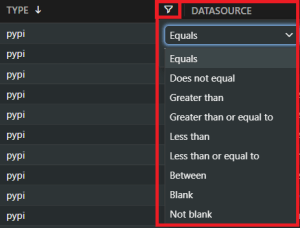
Each column is filterable, with the right-side filter icon. Not only does it let you order in chronological or alphabetical order, but it also allows you to specify and search for specific words or a range of values, so that you can display only the results you want as accurately as possible.
Clicking on the column header applies default filtering (alphabetical or chronological order) and toggling it will change it from increasing to decreasing order and vice versa.
If you provided a datasource a while ago but the timestamp or ingestions status is not updating, that is probably because PatchFox is still ingesting the data. Please keep in mind that the registration of the data depends on the size of the input you are providing – if you are onboarding a huge codebase, it will obviously take a longer time compared to you onboarding a single, small repo with one or two files.
Once a datasource is fully ingested, the Status column will change to “Accepted” and data will start populating in the Track dashboard. If anything goes wrong during the data ingestion process, you should be able to filter these datasources with the Status column by searching for the “Internal Server Error” status.
If anything in the Input dashboard seems wrong or if you have any questions or concerns, please reach out to us with the Help button or email us at ask@patchfox.io.
Frequently Asked Questions #
Q: What datasets do you currently support?
A: We currently support Gitlab, but are working to add support for other datasets as well.
Q: Are there any language types you do not support?
A: Our ingestion tool supports all major languages and package managers, and these should be successfully detected by our tool while ingesting your data. If you run into issues or have a specific question or concern about the language you are using, please reach out to us at ask@patchfox.io.
Q: It seems like the “type” column shows the language my datasource is using. What if I have multiple different languages that my data uses?
A: As we treat each language as a separate input/datasource, we create a separate row for each language type, with each input name as “{input name}_{language}” to distinctly separate between languages. This means that for one repository, you may have multiple rows of data.
Q: How do I know if my data ingestion is complete?
A: At any time, you can filter with the Status column to see the ingestion status of any dataset. Once the status becomes “Accepted” for these rows, the ingestion is complete and you will see the data populate on your Track dashboard. Currently, notifications or alerting is not supported, but we plan to add it in the future to efficiently notify users once their data ingestion is complete.
Q: If users onboard multiple branches (same datasource though), what happens here?
A: As mentioned above, our datasources are a repository::branch format, so the two datasources will appear in two different rows, distinguishable by the branch.
Q: My data ingestion status shows “Internal Server Error”. What went wrong?
A: You should first investigate to see possible reasons why the ingestion would have failed for that specific datasource (e.g. do the datasources that failed to be ingested have anything in common?) If you still have questions or concerns, please reach out to us with the Help button or email us at ask@patchfox.io.
Q: How can I delete a dataset from this dashboard?
A: Since this dashboard keeps a history of your datasources as you add them, the datasources do not magically disappear even if you remove the PatchFox job from your repository. For any datasources that you want to remove, you would have to delete them manually. We are currently adding support for this functionality but in the meantime, you can email us at ask@patchfox.io if you would like specific datasources removed.


